Find and remove duplicate photos — safely.
The duplicate photo finder purpose-built for merged phone backups. Catches exact duplicates, WhatsApp-compressed copies, and resized edits across your folders — keeping the highest-resolution original with guaranteed one-copy protection and full undo.
Nothing protected. Files here are scanned and shown, but can never be removed.
Nothing excluded. These folders are not read at all.
Files go to the Recycle Bin, never deleted outright. One copy of every photo is always kept.staksoft.com
Why Generic Cleaners Fail
Built for the mess of merged phone backups.
Traditional tools check file hashes. When you back up phones, messengers re-compress every image, turning identical memories into different files on disk.
Does it find WhatsApp & resized photo duplicates?
Why won't it delete burst photos of moving subjects?
Will it ever accidentally delete my only original copy?
Does it safely handle OneDrive placeholders and Live Photos?
4-Tier Perceptual Matching Engine
Each tier only inspects what previous tiers could not resolve, delivering lightning speed without sacrificing mathematical precision.
What It Catches
Byte-for-byte identical copies anywhere on your drives.
Technical Implementation
Streaming SHA-256 reader processing 64 KB chunks with an early-exit file size filter.
Precision You Control
4 Tailored Sensitivity Presets
The candidate radii only decide what gets evaluated. The final Tier-4 correlation decides what gets grouped, so wider presets never sacrifice safety.
Exact
Byte-identicalStrict byte-level duplicates only. Zero false positives guaranteed.
Strict
Lossless Re-savesCatches metadata edits, format conversions (PNG to JPG), and re-saves.
Balanced
RecommendedCatches WhatsApp, Telegram, and messenger re-compressions and resized copies.
Loose
Manual ReviewWidest net for finding cropped, heavily edited, or filtered images.
Safe by design. Never lose a photo.
Engineered so that a cleanup can never cost you a memory. Enforced directly in the Rust core, not merely in the UI.
Windows Recycle Bin + 1-Click Undo
Nothing is permanently unlinked. Removals move safely to the Windows Recycle Bin via Win32 Shell API. Every cleanup batch is logged with a single-click instant restore.
Star-Topology Invariant (Always Keeps One)
The Rust engine enforces a strict safety invariant: selecting every item in a duplicate group will NEVER remove the designated Keeper. A photo that exists in one copy cannot be deleted.
Protected & Excluded Folder Boundaries
Mark sensitive archives as 'Protected' (read-only for matching, immune to deletions) or 'Excluded' (completely unread by the scanner).
Live Photo & Companion Sidecar Integrity
Live Photo video clips (.MOV) and RAW sidecar files (.XMP / .AAE) stay coupled with their primary image. If a companion cannot be moved, the photo is held back.
Cloud Hydration Protection
Detects OneDrive, iCloud, and Dropbox offline placeholder files (Reparse Points / Sparse attributes) and skips them, preventing silent multi-gigabyte downloads.
Pre-Flight Modification Verification
Before moving any file, the engine re-checks file size and timestamp against the scan time to ensure sync tools or image editors haven't modified it in the background.
Groups are Stars, Not Transitive Chains
Why other cleaners delete unique photos: they merge A→B and B→C into one chain. If B is a middle copy, deleting "duplicates" destroys A.
Transitivity links Burst A and WhatsApp C through B. The app merges all 3 and deletes Burst A — a unique photo that exists nowhere else!
Every candidate MUST directly match the verified keeper. Nothing is merged transitively. A single-copy photo can never be selected or deleted.
Duplicate Photos is provided free of charge on an "as is" and "as available" basis without warranties of any kind. While the application is engineered with safety protocols (including star-topology keeper guarantees and Windows Recycle Bin routing), users are solely responsible for reviewing all selected files before cleaning and maintaining independent backups of their media. Staksoft and its developers accept no liability, responsibility, or legal claims for any accidental file deletion, missing photos, or data loss resulting from the use of this software.
More Than Just Duplicates
Find and clear all photo clutter
Surfaces the secondary junk eating up your hard drive — sorted and organized with no automatic risky selections.
True Duplicates
Exact and perceptual duplicate groups with automatic keeper selection.
Similar Photos
Different shots of the same scene kept separately so you never lose distinct moments.
Screenshots
Surfaces all PNG & JPEG screen grabs across all subfolders in one clean view.
Forwards & Graphics
Identifies memes, stickers, infographics, and low-detail messenger graphics.
Blurry Photos
Ranked least-sharp first using Laplacian variance analysis. Nothing is auto-deleted.
Largest Space Hogs
Top-down list of heavy RAW files, 4K videos, and massive panoramas.
Simple 4-Step Workflow
Clean your photo mess in minutes
1. Select Your Folders
Pick your Pictures library, external hard drive, or merged phone backup folders. Add protected folders that should stay read-only.
2. Scan with 4-Tier Precision
The Rust engine hashes and matches exact and perceptual copies in seconds, caching results in SQLite for instant future rescans.
3. Review with Smart Select
Examine groups side-by-side. The app auto-selects lower-resolution and compressed copies while preserving the pristine originals.
4. Clean Safely with Full Undo
Send duplicates to the Windows Recycle Bin with one click. Check your storage dashboard to see reclaimed space, and undo anytime.
Real-World Benchmark
7,547 files / 35 GB (Merged phone backup, PC dump, 2,992 WhatsApp images)
Technical Specifications
Native Windows build requirements
Comparison Matrix
Why Duplicate Photos is in a League of its Own
| Feature & Safety Metric | Duplicate Photos (Free) | Generic Cleaners | Manual Sorting |
|---|---|---|---|
| Exact Byte Matching (SHA-256) | Very Slow | ||
| Perceptual Match (WhatsApp / Resized / Recompressed) | Nearly Impossible | ||
| Burst Shot Protection (Multi-scale correlation) | Subjective | ||
| Star Topology (Guaranteed 1 keeper preserved) | High Error Risk | ||
| Safe Recycle Bin & 1-Click Undo | Limited / Risky | ||
| Live Photo & XMP Companion Awareness | Complex | ||
| Cloud Placeholder (OneDrive/iCloud) Safety | Accidental Downloads | ||
| Privacy (100% On-Device, No Account) | Often Requires Login | ||
| Pricing & Licensing | 100% Free | $30 - $60 / year | Hours of Life |
Windows Installation & SmartScreen Guide
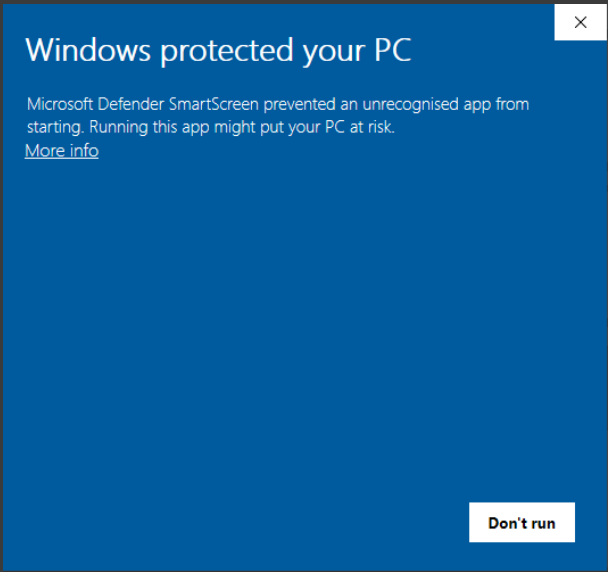
Because Duplicate Photos is a free community tool built for privacy and doesn't use expensive corporate EV code-signing certificates, Microsoft Defender SmartScreen displays a standard informational prompt on first launch. Follow these simple steps:
Download & Open Installer
Download DuplicatePhotos-Setup.exe (~12 MB) and open the file to launch the setup wizard.
Click "More info"
When Windows Defender displays "Windows protected your PC", click the blue underlined "More info" link.
Click "Run anyway"
Click the "Run anyway" button at the bottom right. The app installs per-user with zero admin elevation required.
Frequently Asked Questions
Deep technical answers explaining matching thresholds, burst protection, and storage safety.
Clean your photo library safely today.
Free, native Windows app. Reclaim gigabytes of wasted storage across merged phone backups with 100% on-device privacy and instant undo.
* Disclaimer: Provided "as is" for personal photo library organization. Users are solely responsible for verifying files prior to removal and maintaining independent backups. Staksoft assumes no liability for accidental deletions or data loss.